Google’s new selfie video sign-in turns your face into a kind of spare key for your Google account. If you’ve ever been locked out of Gmail or Drive at the worst possible moment, this new “selfie video verification” option could save you — as long as you set it up in advance.
The feature, officially called selfie video verification, adds a short, pre-recorded clip of you as an identity check for Google account sign-in and recovery. It’s optional, rolling out gradually, and tied to your Google Account security settings — but once it appears for you, enabling it only takes a couple of minutes.
What is Google’s selfie video sign-in?
Selfie video sign-in is a new verification method that lets Google confirm that a real person — specifically you — is trying to access an account or unlock certain services. Instead of just relying on a password, phone number, or recovery email, Google can ask you to record a short selfie video and compare it to the one you set up earlier.
Right now, Google is positioning this mostly as an account recovery tool. If you lose access to your usual recovery options — maybe you changed phone numbers, lost your phone, or can’t get into your backup email — the selfie video can act as another way to prove you’re the legitimate owner.
Google may also use selfie video verification to double-check that there’s a real human behind the screen before letting you into some higher-risk features or services. The idea is to make it harder for automated systems or attackers to spoof their way in.
Who can use selfie video sign-in?
Here’s where things get a little frustrating: selfie video sign-in is rolling out in phases. It’s not available to every account, on every device, or in every region yet.
Google says support is expanding over time, so if you don’t see it right away, that doesn’t mean you’ll never get it — it just means your account hasn’t been included in the rollout wave yet.
A few key limitations to keep in mind:
- You must already be signed in to your Google account to turn selfie video verification on.
- You cannot add a selfie video while you’re locked out or in the middle of the recovery flow.
- Availability can vary by device, account type, and region as Google gradually rolls it out.
In other words, this is very much a “do it now, thank yourself later” situation. If the option is available in your security settings, it’s worth setting up before something goes wrong.
How to set up selfie video sign-in on your Google account
Once the feature hits your account, the setup takes just a few steps. You can do this from a phone or a computer, though recording is usually easiest on a device with a good front-facing camera.
Step-by-step setup guide
Follow these steps while you’re signed in to your Google account:
- Open your Google Account settings.
- On the web, go to your Google Account page from any Google service (like Gmail) by clicking your profile picture and choosing “Manage your Google Account.”
- Go to the Security section.
- In the left-hand menu or tab bar, look for “Security” and select it.
- Find the option for Selfie Video Verification (or similar wording).
- If your account is included in the rollout, you’ll see an option to set up selfie video verification in the security methods or sign-in section.
- Tap or click to start setup, then follow the on-screen instructions.
- Google will walk you through recording a short selfie video.
- Record your selfie video as directed.
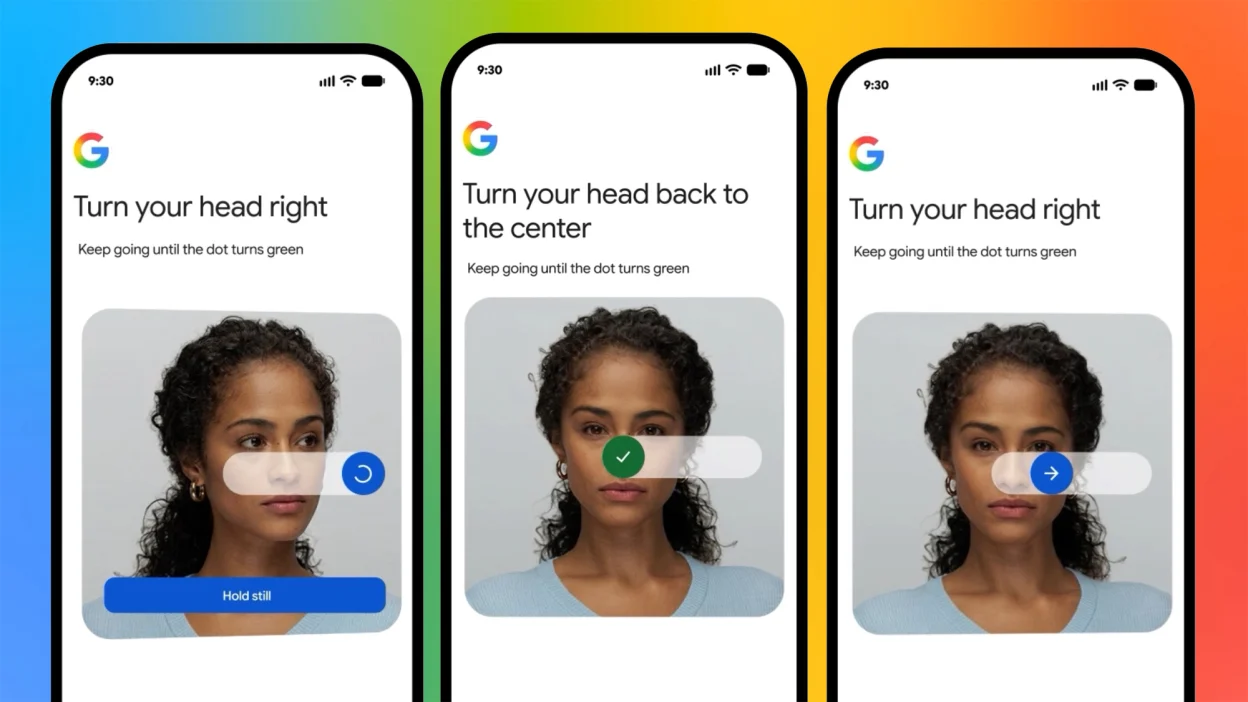
- You’ll be asked to turn your head or move slightly so Google can capture your face from different angles.
- Make sure you’re in a well-lit space where your face is clearly visible.
- Review and confirm.
- Once the recording looks good and Google accepts it, confirm to add selfie video verification as a sign-in and recovery method on your account.
After this, selfie video verification is tied to your account as an extra identity proof. You won’t use it every day like a password or passkey, but it will be there if you hit a wall with standard recovery options.
When Google uses your selfie video
Selfie video sign-in isn’t meant to replace your usual login flow. You’ll still sign in with passwords, passkeys, two-factor codes, and security prompts as normal. The video comes into play in more specific situations.
Account recovery backup
If you lose access to your Google account and can’t use your standard recovery options — like your trusted phone number or recovery email — Google can use the selfie video you set up to help verify your identity. Think of it as a fallback option when everything else fails.
Proving you’re a real person
Google can also use selfie video verification to confirm that an actual human is trying to access certain services or features. This is partly about security — making automated attacks and identity theft harder — and partly about weeding out bots from sensitive flows where a higher level of trust is required.
The company also stresses that the feature helps ensure a real person is attempting to access an account before it unlocks certain Google services. In other words, that 10-second head turn may be your ticket back into important parts of your digital life.
What selfie video sign-in doesn’t do
Because this is a brand-new option, it’s easy to overestimate what it can handle. A few important caveats:
- It’s not a magic unlock button you can add after you’re already locked out. You must configure it while you still have access.
- It doesn’t replace strong passwords, passkeys, or two-factor authentication. It’s an additional verification method, not a shortcut to weaker security.
- It won’t appear for every Google account yet. If you don’t see it under Security, the rollout simply hasn’t hit your account or region.
All that said, for people who live inside their Google account — and that’s a lot of us — having one more way to prove you are who you say you are is not a bad thing.
Should you turn on selfie video verification?
From a pure convenience perspective, selfie video sign-in is an easy yes. It takes a minute to set up and might save you from a much bigger headache later if you’re suddenly locked out of email, photos, documents, and more.
The bigger question is comfort level. Some people are understandably cautious about giving any company more biometric-style data, even if it’s “just a video.” Google is using the clip to verify that a real person is accessing an account or service, and you’re trading a bit of extra data for stronger account recovery options.
If you do enable it, make sure the rest of your security setup is just as solid:
- Use a strong, unique password or a passkey for your Google account.
- Turn on two-factor authentication (2FA) if you haven’t already.
- Keep your recovery phone number and email address current.
- Review your security activity and devices every so often in your Google Account security dashboard.
Selfie video verification sits on top of all that as one more defense layer — especially useful if you travel often, swap phones regularly, or manage multiple Google accounts.
How to tell if you have access yet
Because the selfie video sign-in feature is rolling out gradually, don’t be surprised if it’s missing from your account right now. There’s nothing you can do to force-enable it, but you can quickly check:
- Sign in to your Google account.
- Open the Security tab in your account settings.
- Look for any mention of “Selfie Video Verification” or a similar option under sign-in and recovery methods.
If it’s not there, you’re simply not in the rollout phase yet. Check back periodically — especially after major Google security or account updates — to see if it’s been added.
What This Means
Google’s selfie video sign-in won’t change how you log in every day, but it could make the difference between a stressful lockout and a quick recovery when things go wrong. The company is leaning harder into identity verification that proves there’s a real person behind the keyboard, and this feature is a clear step in that direction.
If you see the selfie video verification option in your Google Account security settings, turn it on while you can. Future you — frantically trying to get back into a locked account — will be glad you did.
Photo: Francisco Goya / Public domain via Wikimedia Commons | Photo: XWxWx / CC BY-SA 3.0 via Wikimedia Commons