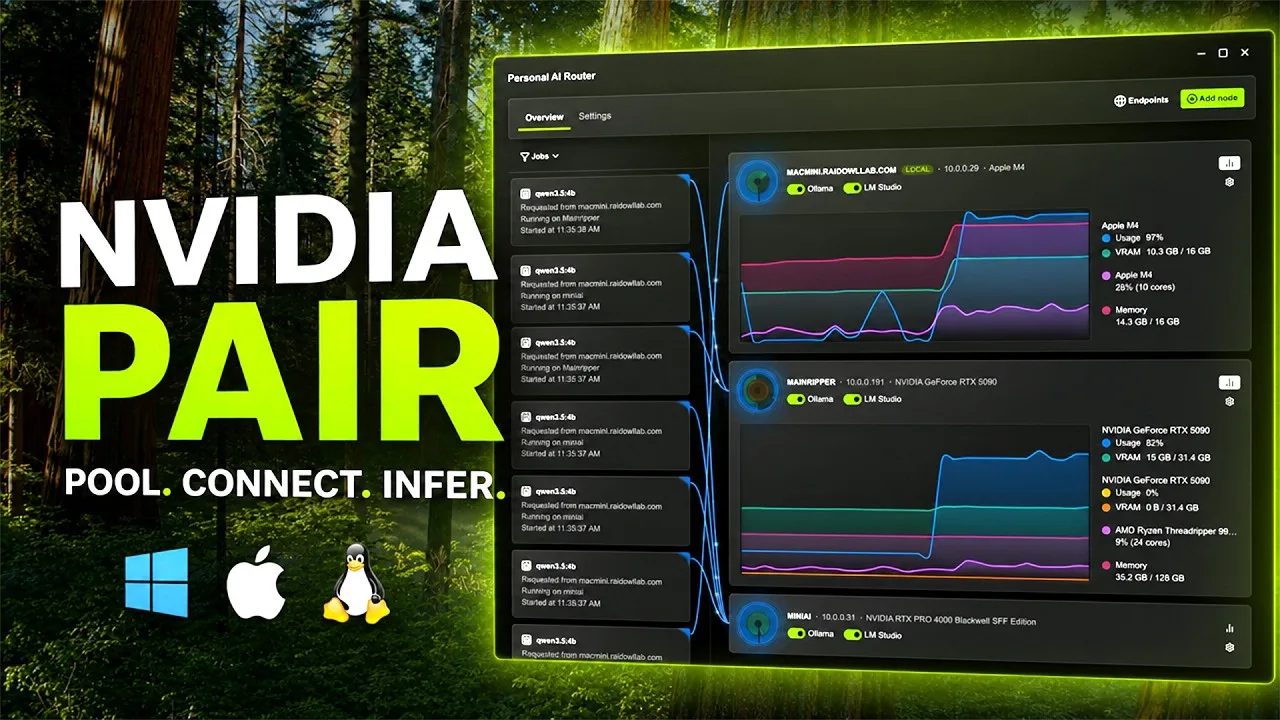
Nvidia has a new answer to a problem that only a certain kind of person has: your local AI agent spawns eight subagents, all eight slam the same graphics card, and your “fast” local setup crawls while a perfectly good gaming PC sits dark in the next room. The fix, announced at IFA 2026, is called PAIR, short for Personal AI Router. It’s free, it’s open source under Apache 2.0, and it does something disarmingly simple. It puts every compatible machine on your home network behind a single address your AI apps already know how to talk to.
No new hardware. No cables. No rack. Just software on each box and a six-digit PIN.
What PAIR Actually Does
Start with what it isn’t, because Nvidia repeats this warning in roughly five different places and there’s a reason. PAIR does not pool VRAM. It does not weld two GPUs into one bigger GPU. It does not split a single model or a single request across machines. Every request lands on exactly one node and finishes there.
What it is: a traffic cop. PAIR is a virtual inference router that sits between your agent and your inference engine. Your app sends an ordinary request to a local endpoint. PAIR reads which engine and model the request needs, picks an eligible machine on your network, forwards the whole thing, and streams the response back through the same connection. The app never knows another computer was involved.
Ollama and LM Studio are the supported backends at launch, and PAIR hijacks the default ports those two services use, which is the clever part. If you’ve already pointed a coding agent or a chat frontend atlocalhost:11434, it keeps working. Nothing to reconfigure, no cluster API to integrate, no harness changes. That design decision is why this has a chance of catching on instead of dying as a weekend project.
The scheduling logic
For each incoming request, PAIR filters the pool by a handful of live signals:
- Is the paired node online and ready to accept work?
- Is a supported inference engine actually enabled on it?
- Does that node have the exact model being requested?
- How many jobs is it already chewing through?
- Is the GPU busy with something else, like a game or a render?
That last one matters more than it sounds. The whole pitch is that your main rig can stay free for gaming or video editing while the laptop upstairs and the mini PC in the closet handle the agent swarm.
Nodes don’t need matching model libraries, either. Different machines can host different models, and PAIR routes based on where a model lives. Loading the same model tag on more nodes just widens the pool of candidates for that request.
The Demo Numbers, and How Much to Trust Them
Nvidia ran a five-subagent test using Hermes Desktop as the orchestrator and Ollama doing the actual work, with Qwen 3.6 35B A3B as the model. The task was a “Sunday Reset” plan built from a synthetic household inbox: sort what’s urgent, what waits, what gets ignored, with evidence attached to each call.
| Configuration | Average completion time |
|---|---|
| Single RTX Spark laptop | 18 minutes |
| Three-node PAIR cluster (RTX Spark laptop + DGX Spark + RTX 5090) | 8 minutes 48 seconds |
Roughly a 2x improvement from roughly 3x the hardware. Nvidia is unusually upfront that this is a configuration-specific demo and not a benchmark, and that scaling is not linear. Credit where it’s due for saying so.
The honest read: this only helps workloads with real parallelism. A single long chat response gets zero benefit. A sequential chain of dependent steps gets close to zero. If only one machine has the model you asked for, congratulations, you have a very elaborate way of using one machine. PAIR pays off when a lead agent fans out into a dozen independent calls at once, which is exactly the workload pattern that’s exploding right now.
Hardware and Platform Support
| Requirement | Details |
|---|---|
| Nvidia GPUs | GeForce RTX 20 Series and newer |
| Workstation GPUs | RTX PRO, Turing architecture and newer |
| Other Nvidia systems | DGX Spark |
| Apple silicon | M4 and newer |
| Operating systems | Windows, macOS, Linux (x64 and Arm64) |
| Inference engines | Ollama, LM Studio |
| Endpoints exposed | Ollama-compatible and OpenAI-compatible |
| Interfaces | Desktop app and terminal (for headless boxes) |
| License | Apache 2.0 |
| Status | Public beta, free |
The RTX 20 Series floor is generous. A 2018-era card can contribute. And the inclusion of Apple silicon is the detail people keep double-taking on: a MacBook running M4 or better can sit in the same cluster as a 5090, which is not a sentence anyone expected from an Nvidia press release.
Setup, Security, and the Fine Print
Getting a cluster running is a one-time chore per machine. Install PAIR, let it find peers over mDNS (you can add a node by IP if discovery is being difficult), send a pairing invitation, and have someone type the six-digit PIN on the other machine. After that, node-to-node traffic runs over mutual TLS with pinned certificates, and the cluster refuses anything that isn’t a member.
Two caveats deserve more attention than they’re getting.
First, that PIN is a short-lived bootstrap code, not a real credential. Nvidia’s own documentation says to pair only over networks and machines you trust.
Second, and this is the one to actually think about: node telemetry stays in plaintext. Hostname, hardware inventory, and current utilization for any machine running PAIR are readable by anything else on the same subnet that bothers to ask. Nvidia calls it a considered trade-off rather than an oversight and flatly advises against running PAIR on a network where that’s unacceptable. If you’re in a dorm, a shared office, or a co-living setup with a flat network, read that twice before installing.
The proxy port itself is better protected. Plaintext requests only work over loopback; anything else from the network gets refused, and the same port serves authenticated TLS to paired nodes only. So it isn’t an open relay. But the telemetry surface is real.
The Wider IFA Push
PAIR didn’t arrive alone. Nvidia used IFA 2026 to make local AI less of a configuration ordeal across the board. Hermes Agent, OpenClaw, and Perplexity’s Portable Computer are all getting simplified one-click local model setup on Windows, where the app detects your GPU, picks a model, and runs it through llama.cpp with Nvidia’s optimizations baked in.
Those optimizations moved too. Nvidia is claiming up to 1.9x higher llama.cpp throughput on an RTX 5090 through kernel work, better speculative decoding, and faster prefill, plus 1.2x on the RTX PRO 6000 Blackwell workstation card and up to 1.4x on dual DGX Spark clusters through vLLM. Those gains flow into LM Studio and Ollama, which happen to be the two engines PAIR routes to. The stack is being assembled deliberately.
And RTX Spark Windows PCs land in October, with Lenovo showing the Yoga Pro 9n and a 2-in-1, and Acer showing a compact desktop concept.
What This Means
PAIR is the least glamorous announcement Nvidia made this month and possibly the most useful. It doesn’t require you to buy anything. It runs on eight-year-old cards. It works with the two local inference tools people already use, and it demands zero changes to the agent software you’ve already set up.
The strategic logic is easy to read. Every hour of agent work that runs at home is an hour not billed by a cloud API, and it’s an hour that makes the GPU you already own look more valuable, which makes the next one easier to justify. Nvidia isn’t giving this away out of generosity. It’s making the case that owning silicon beats renting it, right at the moment when agent workloads are getting parallel enough for that argument to hold up.
The limits are real, and Nvidia states them plainly, which is refreshing. One request, one machine. No VRAM pooling. Parallel workloads only. Beta software with a scheduler that currently leans on queue depth and GPU utilization, with more signals promised later.
If you have two or more capable machines sitting mostly idle and you’re running multi-agent workflows locally, install it this week. If you have one PC, or you mostly do single-threaded chat, skip it for now and check back when the scheduler matures. And if your home network is shared with people you don’t fully trust, read the security notes before you touch it.